



If you’ve ever opened MSI Afterburner mid-game, seen your GPU sitting at 80°C and felt your stomach drop, you’re not alone. Temperature anxiety is one of the most common things first-time PC builders deal with. The internet is full of conflicting advice: Anything over 70°C is dangerous! My GPU runs at 90°C and it’s fine.
Here’s the honest answer: modern GPUs are designed to run hot. What counts as good depends entirely on your GPU model, your workload and whether performance is actually being affected.
What is a Safe GPU temperature?
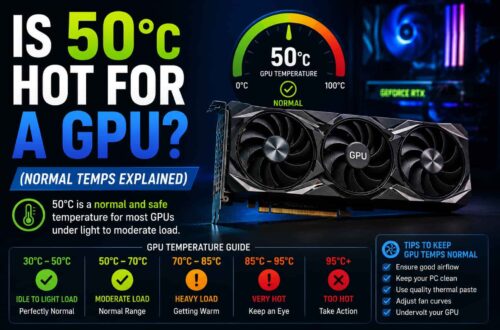
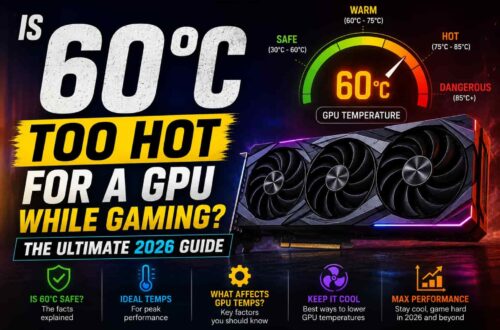
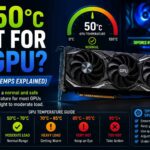
There’s no single perfect number. A Safe GPU temperature is one where your card runs at full performance without thermal throttling, excessive fan noise, or long-term stress on the silicon. Here are practical ranges that apply to most modern GPUs in 2026:
At idle on the desktop, anywhere from 30–45°C is excellent. Up to 55°C is normal. Light use like video playback or web browsing sits comfortably between 45–70°C. Under gaming load, 60–80°C is the normal range for most mid to high-end cards. Heavy AAA games and 4K rendering can push 80–88°C without issue. Sustained workloads like AI inference or long renders can sit at 85–92°C and still be within spec.
These ranges assume a well-ventilated mid-tower case. Laptop GPUs and small form factor builds run noticeably hotter by design.
Why modern GPUs run hotter than older ones
If you owned a GTX 970 that idled at 30°C, then upgraded to an RTX 5080 and saw 45°C at idle, that’s not a problem. That’s progress.
NVIDIA’s GPU Boost and AMD’s RDNA power management are built around thermal targets, not hard ceilings. The GPU constantly asks: can I squeeze more clock speed out if temperatures allow? This means the card actively pushes toward its thermal target, typically 83°C for most NVIDIA Blackwell-gen cards, because that’s where peak boost performance lives. Running below 70°C all the time often means the GPU is holding back.
AMD’s RDNA 4 architecture (RX 9070 XT, RX 9060 XT) adds the hotspot or junction temperature, measured at the hottest point on the die. This is always 10–20°C higher than the core temperature shown in basic monitoring tools. Seeing 100°C junction is normal and expected on RDNA cards during gaming. AMD rates junction temps up to 110°C.
GPU temperatures by workload
Competitive gaming
Low-demand games at high frame rates hammer the GPU constantly rather than allowing any thermal breathing room. Expect 65–80°C on mid-range cards in games like Valorant, CS2, and Fortnite. If you’re creeping past 85°C in a lightweight title, airflow is the issue.
AAA gaming
Heavy rasterization plus ray tracing will push most enthusiast cards to 80–88°C. This is completely normal for the RTX 5080 and RX 9070 XT. Watch for clock speed drops or frame time spikes, those indicate actual throttling, not just heat.
Video rendering and 3D work
Sustained 100% GPU load during long renders can push temperatures to 85–92°C over hours. This is where investing in better airflow pays off, not because it’s dangerous, but because consistent cooling over years of daily use extends hardware life.
When GPU Temperature Becomes a Real Problem
Temperature alone is rarely the problem. The real warning signs are behavioral: frame rates dropping mid-game with no CPU bottleneck, clock speeds visibly falling in monitoring tools, random driver crashes or black screens under load, visual artifacts like flickering pixels or strange color blocks, and the GPU fan running at 100% while temperatures still climb.
If none of that is happening, your GPU is fine, even if a number on screen looks alarming.
How to lower GPU temperature without losing performance
Undervolt the GPU first. This is the single most effective fix. Undervolting reduces the voltage at a given clock speed, cutting heat and power draw without touching performance. In MSI Afterburner, use the Voltage/Frequency curve editor. A well-tuned undervolt can drop temps by 10–15°C.
Fix case airflow next. Positive pressure, more intake fans than exhaust, keeps dust out and ensures cool air reaches the GPU. A mid-tower with three front intakes and one rear exhaust is a solid setup. Cable management matters too; a bundle of cables blocking the GPU intake can raise temps by 5–8°C on its own.
Adjust the fan curve. Most GPU fan curves are tuned for silence, not cooling. Set fans to ramp earlier, say, 50% at 70°C instead of 80°C. Louder, but noticeably cooler under load.
Clean dust filters every 2–3 months if you’re in a dusty environment. For GPUs older than three years, consider reapplying thermal paste, the factory compound degrades and can raise temps by 5–10°C.
Best tools to monitor GPU temperature
MSI Afterburner is the standard. It shows core temp, hotspot temp, fan speed, clock speed, and power draw in real time, and handles fan curves and undervolting. HWiNFO64 gives more detailed sensor data, best for diagnosing VRM and memory temperatures alongside the GPU core.
GPU-Z is a quick snapshot tool, useful for a fast check but not live monitoring. NVIDIA App and AMD Adrenalin are first-party options that cover basic monitoring, fan controls, and performance overlays without needing third-party installs.
Conclusion
Modern GPUs are engineered to run at temperatures that would have seemed alarming a decade ago. A good GPU temperature isn’t the lowest one, it’s the one where your card maintains full performance, stable clocks, and acceptable fan noise. If you’re not throttling and not crashing, you’re good.
Frequently asked questions
Is 80°C too hot for a GPU while gaming?
No. For most modern mid-range and high-end GPUs, 80°C under gaming load is completely normal. If performance is stable and there is no thermal throttling, there is nothing to worry about or fix.
What temperature causes thermal throttling?
It depends on the GPU model and architecture. Most modern NVIDIA GPUs typically begin thermal throttling around 83–87°C, while AMD GPUs often throttle based on junction temperature, usually around 95°C+. When throttling starts, the GPU automatically reduces clock speeds and voltage to control heat.
Is 70°C a good GPU temperature?
Yes. Around 70°C under gaming load is considered a very good and healthy operating temperature. At idle, however, it may indicate slightly aggressive background load or a fan curve that could be optimized, but it is not harmful.
Does a lower GPU temperature always mean better performance?
Not necessarily. Modern GPUs are designed to boost performance dynamically up to a thermal target. A GPU running at 60°C may not boost as aggressively as one running at 75–80°C. The real goal is stable performance without thermal throttling, not the lowest temperature possible.
Are laptop GPU temperatures higher than desktop GPUs?
Yes. Laptop GPUs typically run much hotter due to compact cooling systems and limited airflow. It is common for them to operate between 85–95°C under gaming load. This is within design limits, but sustained 100°C+ temperatures with throttling may indicate dust buildup or cooling inefficiency.