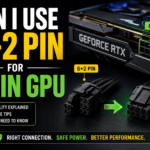




A 6+2-pin PCIe power connector is built specifically to convert into a full 8-pin GPU connector. When it comes straight from your power supply, it’s not a workaround — it’s the intended design. Plug both sections in together, and your graphics card gets exactly the power it needs.
Still, this question trips up a lot of PC builders, especially first-timers. The reason is simple: the connector looks like it’s two separate things. There’s a 6-pin block and a smaller 2-pin block sitting right next to it, often slightly detachable. That makes people assume they’re different parts meant for different jobs. They’re not.
Let’s break down exactly how this works, why PSUs are made this way, and where things actually go wrong.
What Is a 6+2 Pin GPU Connector?
A 6+2 pin connector is a PCIe power cable with 6 fixed pins and a removable 2-pin clip attached to the side.
Here’s why it’s built that way:
- Older or budget GPUs only needed 6 pins (75W)
- Newer, power-hungry GPUs need 8 pins (150W)
- Instead of making two separate cables, PSU manufacturers combined both into one flexible connector
Snap the 2-pin piece onto the 6-pin block to get a complete 8-pin connector that locks into your GPU’s 8-pin socket. This single-cable design allows one PSU cable to support multiple generations of GPUs without requiring extra cables in the box.
Is a 6+2 Pin the Same as an 8-Pin GPU Connector?
Electrically, yes, when joined together.
- Same pin layout: The 6+2 combined connector matches the PCIe 8-pin specification pin-for-pin.
- Same power delivery: It carries the same voltage and current path as a “true” 8-pin cable.
- Same PCIe-SIG standard: Both follow official PCI Express power connector specifications, so there’s no electrical compromise.
How Sense Pins Actually Work
Two of the eight pins on a PCIe connector aren’t power pins at all — they’re sense pins. When both the 6-pin and 2-pin sections are fully seated, the sense pins tell the GPU “you have a full 8-pin connection, you’re cleared to draw up to 150W.” If only the 6-pin section is connected and the 2-pin clip is left dangling, the sense pins report a 6-pin-only connection, and the GPU limits itself to 75W regardless of what the PSU could actually supply. This is exactly why a “half-plugged” connector causes crashes rather than just reduced performance — the card isn’t being starved of power that’s available, it’s being told by design not to ask for more.
How Much Power Does an 8-Pin GPU Connector Provide?
This is where understanding wattage matters.
| Connector Type | Max Power |
|---|---|
| 6-pin connector | Up to 75W |
| 8-pin connector (or fully joined 6+2) | Up to 150W |
| PCIe x16 slot (from motherboard) | Up to 75W |
| 12VHPWR / 12V-2×6 connector | Up to 600W |
So a GPU using one 8-pin connector plus the slot can draw up to 225W total. A card with two 8-pin connectors can draw up to 375W.
Real example: An RTX 4070 typically needs one 8-pin (or fully connected 6+2) connector. Plug in only the 6-pin section and leave the 2-pin dangling, and you’re capping the card at 75W from that cable — well short of what it needs under load. The result is crashes, throttling, or the card refusing to boot at all.
What About 12VHPWR and 12V-2×6 Connectors?
High-end RTX 40-series and RTX 50-series cards (like the RTX 4090 or RTX 5080) often ship with a single 12VHPWR connector (or its revised 12V-2×6 version) instead of multiple 8-pin connectors. This connector can deliver up to 600W through one cable, but it requires a genuine, fully-seated connection — partial insertion has been linked to connector overheating and melting in some early reports. If your card uses 12VHPWR, most GPU boxes include an adapter that converts multiple 8-pin (or 6+2) connectors from your PSU into a single 12VHPWR plug; some newer PSUs now include a native 12V-2×6 cable instead. Either way, the “fully seat the connector” rule matters even more here than with standard 8-pin connectors.
When Can You Use a 6+2 Pin Connector?
Almost always, for modern GPUs that specify an 8-pin requirement:
- NVIDIA RTX cards (RTX 3060 Ti through RTX 4070-class cards) commonly use one or two 8-pin/6+2 connectors.
- AMD Radeon cards like the RX 7800 XT typically require two 8-pin connectors for full power delivery.
- Intel Arc GPUs also follow the same 8-pin PCIe standard on mid-to-high-end models.
If your GPU’s manual says “requires one 8-pin connector,” a 6+2 connector from your PSU satisfies that requirement completely, as long as both segments are connected.
When Should You NOT Use Adapters?
This is where real risk shows up — not with the 6+2 connector itself, but with cheap adapters bridging the gap.
- Molex to PCIe adapters: Molex connectors weren’t designed for sustained high current draw. Using one to power a modern GPU can overheat the adapter.
- SATA to PCIe adapters: Same problem — SATA power rails aren’t built for GPU-level loads.
- No-name splitters: Thin-gauge wiring and poor connections can cause voltage drops, instability, or melted connectors under sustained gaming loads.
If your GPU needs more power than your PSU’s native cables provide, the fix is a higher-wattage PSU from a reputable brand (Corsair, Seasonic, EVGA, be quiet!, and similar), not a stack of adapters.
How to Connect a 6+2 Pin Connector to an 8-Pin GPU
- Power down and unplug your PC before touching any cables.
- Locate the correct PSU cable. On a modular PSU, plug the cable into the port labeled PCIe or VGA — never a CPU (4+4 pin) port, even if it looks similar.
- Join the 6-pin and 2-pin clips so they form one solid 8-pin block.
- Align the connector with the GPU’s power socket; the clip should face a direction that lets it click in.
- Push firmly until you hear a click. A loose connection is one of the most common causes of GPU power issues.
- Repeat for any second connector if your GPU requires two.
- Power on and check that the GPU fans spin and the display outputs properly.
Common GPU Power Problems
GPU not turning on: Usually a power cable isn’t fully seated, or the PSU doesn’t have enough free wattage.
GPU fans spin but no display: Often a sign of insufficient or unstable power delivery rather than a dead card — check connections and PSU capacity before assuming a hardware fault.
Black screen after installation: Check that the monitor cable is plugged into the GPU, not the motherboard, and confirm power cables are fully seated.
GPU power connector not fitting: Never force it. Confirm you’re using the PCIe cable, not a CPU cable — they can look alike but aren’t interchangeable.
GPU power warning messages: Modern GPU software (like NVIDIA or AMD drivers) can flag insufficient power. Reseat cables and confirm PSU wattage before assuming it’s a hardware fault.
PSU Compatibility Checklist
Before installing any GPU, verify:
- Wattage headroom: Your PSU should comfortably exceed the GPU’s listed power draw, with margin for the rest of your system.
- PSU quality: Stick to reputable brands with stable voltage delivery, especially for high-end GPUs.
- Modular cables: Use only the cables that came with your specific PSU model.
- Rail design: Most consumer PSUs use a single 12V rail, which simplifies power delivery across multiple GPU connectors; higher-end units sometimes use multi-rail designs, which distribute load differently and are worth checking against your GPU’s connector count.
Never mix PSU cables between brands. Pin mapping isn’t standardized across manufacturers, and using a cable from a different PSU brand can cause a short circuit, even if the connector physically fits.
Conclusion
A 6+2 pin connector isn’t a compromise — it’s literally designed to function as a full 8-pin GPU power connector. Connect both sections fully, and your card gets the exact power delivery it was built for.
Stick with your PSU’s original cables, avoid cheap adapters, and double-check your PSU’s wattage against your GPU’s requirements before installation. Get the connection right, and power issues stop being something you have to troubleshoot at all.
Frequently Asked Questions
Can a 6+2-pin connector power an 8-pin GPU? Yes. When both segments of the 6+2 pin connector are attached, it functions as a full 8-pin PCIe connector and delivers the power your GPU is designed to receive.
Is a 6+2 pin connector identical to an 8-pin connector? Electrically, yes. A 6+2 pin connector provides the same functionality as a standard 8-pin PCIe connector. The only difference is that it is split into two pieces for broader compatibility.
Can I use only the 6-pin section of a 6+2 connector? Only if your graphics card specifically requires a 6-pin power connector. If your GPU needs an 8-pin connection, using only the 6-pin section can limit power delivery and lead to instability or startup issues.
Does an RTX GPU require a full 8-pin connection? Most NVIDIA RTX graphics cards require a complete 8-pin connection, while some higher-end models may need multiple 8-pin connectors or a 12VHPWR/12V-2×6 cable. Always verify the power requirements of your specific GPU model.
Are PCIe power adapters safe to use? Native PCIe cables supplied with your power supply are the safest option. While some adapters may work, low-quality SATA-to-PCIe or Molex-to-PCIe adapters can cause power delivery problems and should generally be avoided.
What happens if a GPU does not get enough power? A GPU that does not receive sufficient power may experience crashes, black screens, reduced performance, system instability, or may fail to boot altogether. Proper power connections are essential for reliable operation.
What is a 12VHPWR connector and is it different from an 8-pin? Yes, it’s a newer, single-cable connector used on high-end RTX 40/50-series cards that can deliver up to 600W, compared to 150W for a standard 8-pin. It requires a fully-seated connection to operate safely and reliably.