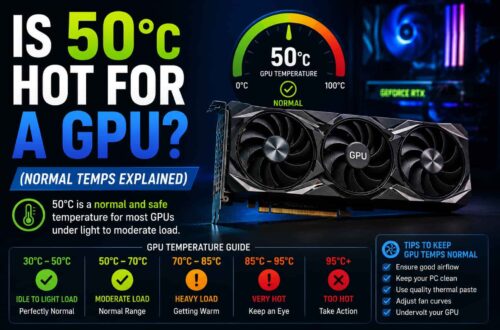






Absolutely not. In fact, 60°C is an excellent temperature for a GPU under load. It’s well below the thermal limits where you’d see performance drops (which usually start around 83–85°C), and it indicates that your airflow and cooling are doing a fantastic job. You can stop watching your temperature graphs and get back to your game—your card is performing exactly how it should be.
Is your GPU hitting 60°C and making you nervous? Stop the panic—that’s actually a gold-standard temperature for modern gaming.
Understanding GPU Thermals: Core vs. Junction
To understand if 60C is safe, you must first understand what you are actually measuring. Modern GPUs in 2026 report several different temperature sensors, and mistaking one for another is a leading cause of “temperature anxiety”.
GPU Core Temperature: This is the average reading across the entire GPU die. This is what Windows Task Manager and most basic overlays show. When you see 60C, you are likely looking at this average.
Junction (Hotspot) Temperature: This is the reading from the single hottest point on the silicon. On AMD RDNA 4 and NVIDIA Blackwell cards, the junction temperature can be 15-30C higher than the core average. If your core is at 60C, your junction might be 80C, which is still perfectly healthy.
Ambient Impact: Your GPU temperature is relative to the air outside your case. A 60C GPU in a 35C room (95F) is achieving miraculous cooling, whereas 60C in a 15C room (59F) indicates more standard thermal performance.
Healthy Temperature Ranges: Why 60C is “Cool”
In 2026, the definition of a “good” temperature has shifted upward as power draw has increased. Here is how 60C fits into the broader thermal landscape:
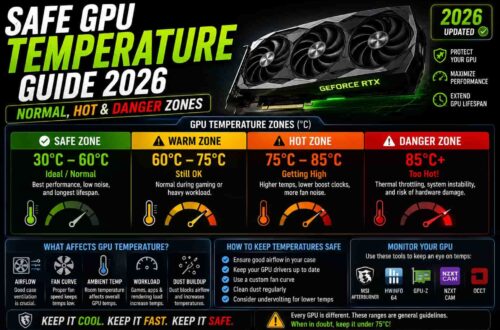
Idle (Desktop/Light Use): 30C to 45C. In this range, fans are often completely off (Zero RPM Mode) [source: 1, cite: 4]. If you are asking “is 44c good for gpu,” the answer is yes—it is a standard idle temperature. Even “is 53c gpu temp good” can be normal if your fans haven’t kicked in yet.
Gaming/High Load: 65C to 85C. This is the “green zone” for AAA gaming. Because 60C sits even lower than this standard gaming range, it is considered a premium thermal result, usually seen on cards with massive triple-fan coolers or liquid cooling.
Healthy Operating Ranges for Desktop GPUs:
- Idle Temperatures (Desktop/Light Use): Typically between 30C to 45C (86F to 113F). In 2026, many cards utilize “Zero RPM Mode,” where fans stop completely during light tasks like web browsing to reduce noise and wear.
- Gaming/High Load: A safe and normal range is 60C to 85C (140F to 185F). Most enthusiast-grade cards are designed to boost their clock speeds right up to these thermal targets to extract maximum performance.
The 60C Question: Is it Safe?
To explicitly answer the main keyword: Yes, 60C is incredibly safe for a GPU. It is well below the threshold where thermal throttling or hardware damage occurs. Let’s address some common variations of this thermal anxiety:
Is 64C hot for a GPU?
No. 64C is a fantastic temperature for a GPU under load. It indicates that your case has excellent airflow and your GPU’s cooler is working efficiently.
Is 60C normal for my GPU?
Yes, it is perfectly normal. Many modern GPUs are tuned to maintain silence until they reach this range. If your fans have just started spinning at 60C, the system is working exactly as the manufacturer intended.
Is 70C too hot for the GPU?
Absolutely not. 70C is considered a very “comfortable” gaming temperature. Even up to 80C is within the standard “green zone” for high-end cards like the RTX 40 and 50 series.
Laptop vs. Desktop: Thermal Reality
Laptop GPUs operate under fundamentally tighter constraints than their desktop counterparts. Due to smaller heatsinks, shared cooling pipes with the CPU, and limited airflow in a thin chassis, laptop GPUs regularly reach 75C to 90C under gaming load.
If you see your laptop GPU at 60C while gaming, you are actually achieving rare thermal performance for the platform. It is far more common to see laptops hitting the 85C+ range. This is expected behavior and is factored into the engineering of the machine.
Factors Influencing Your GPU Temps
If you aren’t seeing 60C and are instead hitting 80C+, several factors are likely at play:
1. Case Design and Airflow: A “choked” case with a glass front panel can raise temperatures by 10C or more. Proper positive pressure (more intake than exhaust) ensures the GPU always has fresh air.
2. Dust Buildup: Dust acts as an insulator on heatsink fins. Blasting your card with compressed air every 6 months can drop temps significantly.
3. Workload Intensity: Gaming at 4K or using AI rendering pushes the GPU significantly harder than 1080p gaming, leading to higher thermal output.
Several environmental and hardware factors dictate how hot your silicon runs:
1. Workload (Gaming vs. Rendering): Heavy gaming (like Rust) or professional rendering pushes GPUs harder and longer than casual use. Tasks that saturate both the compute cores and VRAM will naturally produce more heat.
2. Ambient Temperature: Your GPU cannot cool below the temperature of the air entering the case. A 35C room in summer will push your GPU temperatures 10-15C higher than in a 20C air-conditioned room.
3. Case Design and Airflow: Proper airflow is the single biggest factor in GPU thermals beyond the cooler itself. A case with one front intake and one rear exhaust can drop temperatures by 8-12C compared to a choked, “all-exhaust” setup.
When to Worry: Real Danger Signs
You should stop worrying about 60C and only start taking action if you see these symptoms:
Thermal Throttling: Usually occurring at 83C-85C, the GPU reduces its clock speed to protect itself, resulting in sudden FPS drops.
Artifacting: Visual glitches like flickering pixels or strange colors can indicate VRAM or core overheating.
Emergency Shutdown: If the chip hits 100C+, the PC will simply turn off to prevent permanent hardware damage.
While 60C is safe, there are thresholds you should monitor. Heat only becomes dangerous when it is sustained above safe limits or accompanied by performance drops.
Thermal Throttling (The Yellow Zone): Around 83C to 85C for NVIDIA cards, the GPU will automatically reduce its clock speed to prevent damage. You will notice this as sudden FPS dips.
The Danger Zone (The Red Zone): Core temperatures consistently above 90C on a desktop GPU are concerning. While modern chips have built-in protection and can survive up to 105C before an emergency shutdown, running at these extremes for months can accelerate component wear and dry out thermal paste.
Optimization Strategies for 2026
If you want to maintain that “cool” 60C target, use these techniques:
How to Undervolt GPU: Using tools like MSI Afterburner, you can reduce the voltage supplied to the core. This reduces heat significantly—often by 5-10C—with almost zero impact on gaming performance.
Custom Fan Curves: Manufacturers prioritize silence, so they let cards get hot. Setting your fans to spin at 50% at 65C instead of waiting for 75C can keep your temps stable and prevent heat soak.
If you want to maintain that “cool” 60C or lower your current temps, follow these optimization steps:
Clean Dust Regularly: Dust buildup acts as insulation. Clean your GPU heatsink and case filters every 6 months to prevent a 10-15C thermal penalty.
Undervolt the GPU: This is the most effective fix. Reducing the voltage to your GPU can decrease heat output by 5-10C without sacrificing performance.
Custom Fan Curves: Use MSI Afterburner to set an aggressive fan curve. Setting fans to spin at 50% at 65C instead of waiting for 75C can keep temperatures much more stable.
Frequently Asked Questions (FAQ)
Is 60c safe for gpu?
Yes, it is more than safe; it is an excellent temperature that will ensure the maximum lifespan of your hardware.
What is gpu junction temp?
It is the hottest single point on the GPU die. It is normal for this to be 15-30C higher than the core temperature.
Is 74c bad for gpu?
No, 74C is a very standard and healthy gaming temperature for both desktop and laptop GPUs.
Is 87c too hot for gpu?
It is not immediately dangerous, but it is high enough to trigger thermal throttling. You should investigate your airflow if you hit this consistently.
Gpu usage while gaming:
Ideally, you want 95-100% usage, indicating your GPU is the primary worker. High usage naturally creates the heat discussed in this guide.
Do gpu brands matter?
Yes. While the chip is the same, brands like ASUS, MSI, and Sapphire design the coolers. Premium brands often stay closer to 60C, while budget brands might run at 75-80C.
Are gpu fans always on?
No. In 2026, most cards use “Zero RPM Mode,” where fans only turn on once the GPU hits roughly 55-60C.
Is 60C hot for GPU idle?
Yes, 60C is high for an idle state. Most GPUs should idle between 30-45C. If you are hitting 60C at the desktop, check for high ambient temps, dust, or background crypto-mining malware.
Average GPU temp while gaming?
The industry average for a modern, well-cooled GPU under load is 65C to 85C.
Is 80C too hot for a GPU?
No, 80C is within the normal operating range for many cards under heavy load. However, keeping it below 85C is better for long-term component health.
GPU 60 degrees while gaming laptop?
This is an excellent result. Laptop GPUs usually run much hotter (75-90C).
Conclusion
No, 60°C is not too hot for a GPU while gaming. In fact, it is one of the best temperatures you can see under load. Most modern GPUs are designed to run safely between 65°C and 85°C during gaming, so 60°C shows that your cooling system and airflow are working very well. Whether you use a desktop or laptop, there is no need to worry if your GPU stays around 60°C while gaming. Keep your system clean, maintain good airflow, and monitor temperatures occasionally to ensure long-term performance and reliability.