



You see two graphics cards side by side. One runs at 2500 MHz. The other runs at 1800 MHz. Common sense says the faster one wins. Then the benchmarks drop and the 1800 MHz card delivers more FPS in every game.
That moment confuses a lot of buyers. It confused me the first time I saw it too. But once you understand what GPU clock speed actually controls and what it does not control, those benchmark results make perfect sense.
This guide breaks it all down in plain language. No engineering jargon. No theory for the sake of theory. Just clear explanations and real gaming examples that help you understand exactly what clock speed means for your experience.
What Is GPU Clock Speed?
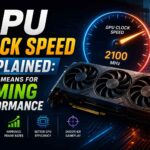
GPU clock speed measures how many processing cycles your graphics card completes every second. It is measured in megahertz or gigahertz. One megahertz equals one million cycles per second. A GPU running at 2400 MHz completes 2.4 billion processing cycles every second.
Think of it like a factory assembly line. Each cycle is one pass of the line where workers complete their assigned task. A faster line speed means more passes per second and more output overall.
Inside your GPU, each of those cycles involves thousands of shader processors handling lighting calculations, shadow rendering, texture sampling, geometry processing, and everything else that turns game data into pixels on your screen. More cycles per second means more of that work gets done faster.
Clock speed controls the pace of work. It does not control how many workers are on the assembly line or how efficient each worker is. That distinction is critical, and it is the reason two GPUs with very different clock speeds can perform almost identically in real games.
Base Clock vs Boost Clock Explained
Every modern GPU ships with two clock speed numbers, and most buyers only read one of them.
Base Clock
The base clock is the minimum guaranteed frequency your GPU will maintain under any sustained gaming workload.
It is a floor, not a ceiling. Your GPU will almost never actually run at base clock during normal gaming because modern GPUs are designed to push well above it whenever thermal and power headroom exists.
Think of a base clock as a safety promise from the manufacturer. They are guaranteeing your card will perform at least this well under the worst conditions.
Boost Clock
The boost clock is the target frequency your GPU aims to reach and maintain during actual gaming workloads. This is the number that matters in practice. When you launch Cyberpunk 2077 and the GPU gets fully loaded, it ramps from base clock up toward boost clock within seconds. How long it stays at boost clock and how far above it the card can climb depends on thermals, power delivery, and the specific GPU model.
Some GPUs exceed their rated boost clock consistently. Cards with strong cooling solutions and generous power limits can sustain frequencies above the official boost spec for entire gaming sessions. Others hit the rated boost briefly and then settle slightly below it as temperatures stabilize.
The gap between base clock and boost clock is also meaningful. A GPU with a 1500 MHz base and 2700 MHz boost has enormous headroom. A card with a 2300 MHz base and 2450 MHz boost will behave much more consistently but with less dynamic range. When you are comparing two GPUs, always compare boost clocks. Base clocks are marketing minimums.
How GPU Clock Speed Affects Gaming Performance
Clock speed influences gaming performance, but its impact is more nuanced than a simple MHz comparison suggests.
Higher clock speed means each shader processor completes its work faster. In a scene where every shader is fully occupied, increasing clock speed from 2000 MHz to 2200 MHz delivers roughly a 10 percent improvement in raw throughput. In practice that translates to roughly 5 to 9 percent more FPS depending on how GPU-bound the game is at your resolution and settings.
Frame stability benefits from consistent clock speeds more than raw peak frequency. A GPU that maintains 2300 MHz steadily throughout a Red Dead Redemption 2 session will feel smoother than one that swings between 1900 MHz and 2500 MHz unpredictably. Those swings show up as frame time inconsistency, which your eye perceives as stuttering even when average FPS looks acceptable.
Different games respond to clock speed changes differently. Cyberpunk 2077 at 4K with ray tracing pushes the GPU so hard that every extra MHz translates directly to visible FPS improvement. Fortnite at 1080p competitive settings is barely GPU-limited at all on modern hardware, so clock speed changes have almost no measurable impact on your frame rate there.
Does Higher Clock Speed Always Mean Better GPU?
No. And understanding why not is one of the most important things any GPU buyer can learn. Architecture determines how much work each shader processor accomplishes per clock cycle. Newer GPU architectures squeeze dramatically more useful rendering work out of each MHz than older ones.
NVIDIA’s Ada Lovelace architecture, used in RTX 40-series cards, delivers significantly more performance per MHz than Ampere, used in RTX 30-series cards. An RTX 4070 running at 2475 MHz will outperform an RTX 3080 running at 1710 MHz in most gaming benchmarks despite the enormous clock speed gap. The newer card accomplishes more per cycle across its shader array.
AMD’s RDNA 3 architecture showed similar generational efficiency improvements over RDNA 2. The RX 7800 XT at lower MHz figures outperforms the RX 6800 XT at higher frequencies because each shader in the newer architecture handles more work per tick.
The number of shaders also multiplies the effect of clock speed. A GPU with 16,000 shaders at 2000 MHz is processing twice as much parallel work per second as one with 8,000 shaders at the same clock speed.
When you see two GPUs with similar clock speeds performing very differently in Black Myth: Wukong benchmarks, architecture and shader count are almost always the explanation.
Why GPU Clock Speed Keeps Changing While Gaming
Open GPU-Z or MSI Afterburner during a gaming session and watch the clock speed readout. You will notice it is not a fixed number. It moves constantly, sometimes by hundreds of MHz within seconds.
Thermal Throttling
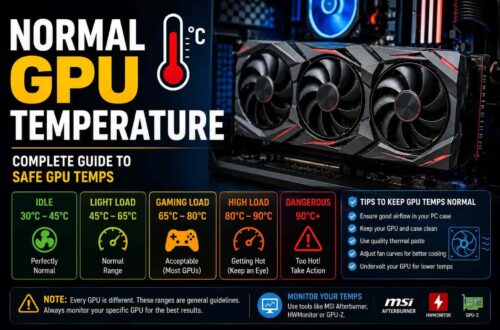
Every GPU has a maximum temperature limit. When the GPU approaches that limit, it reduces clock speed to bring heat output down.
This is not a failure. It is a safety system working correctly. But it does mean that a GPU in a hot case with poor airflow will consistently perform below its potential even if nothing is technically wrong.
Sustained thermal throttling in Hogwarts Legacy or GTA V on a hot summer afternoon can cost 10 to 20 percent of GPU performance compared to the same session in a cool, well-ventilated environment.
Power Limits
Every GPU has a total power budget measured in watts. When the GPU hits that ceiling, it cannot draw more power to maintain peak frequency and must reduce clock speed to stay within its limit.
High-end cards like the RTX 4090 and RX 7900 XTX have generous power budgets that rarely constrain performance in typical gaming scenarios. Mid-range cards have tighter limits that become relevant at very high overclocks or during exceptionally demanding scenes.
Dynamic Boost Technology
NVIDIA’s GPU Boost and AMD’s equivalent frequency scaling systems continuously adjust clock speed based on available thermal and power headroom.
When a scene is less demanding and temperatures drop slightly, the GPU boosts higher. When a demanding scene pushes temperatures up, the GPU pulls back. This dynamic behavior happens dozens of times per second and is why you see that constantly moving clock speed readout during gameplay.
How to Check GPU Clock Speed in Real Time
MSI Afterburner
MSI Afterburner is the most widely used GPU monitoring tool in PC gaming. Install it with RivaTuner Statistics Server. Open the monitoring tab, enable GPU clock speed, and assign it to your on-screen display. You will see live clock speed data overlaid inside every game you play.
GPU-Z
GPU-Z provides detailed GPU sensor data including core clock, memory clock, voltage, power draw, and temperature. Open the Sensors tab while gaming to watch how clock speed responds to different scenes in real time. It is lighter than Afterburner and useful for quick diagnostics.
HWiNFO
HWiNFO gives the most comprehensive hardware data available in any free monitoring tool. Run it in Sensors mode and find the GPU section for clock speed, effective clock, GPU utilization, power consumption, and temperature all in one view. It also supports data logging for post-session analysis.
GPU Clock Speed vs FPS in Real Gaming Scenarios
In Cyberpunk 2077 at 4K with path tracing enabled, the GPU is fully saturated every single frame. Clock speed improvements translate almost linearly to FPS gains here. A 10 percent clock speed increase through overclocking will deliver roughly 7 to 9 percent better frame rates in this scenario.
In Call of Duty Warzone at 1440p competitive settings, the game engine creates a mixed CPU and GPU workload. Clock speed improvements help but with diminishing returns compared to a pure GPU-bound scenario. A 10 percent clock speed increase may deliver 4 to 6 percent more FPS at best.
In Fortnite at 1080p with performance mode enabled, the rendering workload is so light that even a mid-range GPU has abundant headroom. Increasing clock speed in this scenario produces almost no measurable FPS improvement because the GPU is already finishing each frame long before the next one is needed.
Matching your clock speed expectations to the specific game and resolution you are targeting avoids a lot of disappointment when overclocking results seem smaller than expected.
Overclocking GPU Clock Speed
Overclocking pushes your GPU’s clock speed beyond its factory-rated boost frequency.
You do this through MSI Afterburner by increasing the core clock offset, raising the power limit, and adjusting the fan curve to manage the additional heat. Most modern GPUs have 5 to 15 percent overclocking headroom before stability becomes an issue.
A successful overclock on an RTX 4070 might push boost clocks from 2475 MHz to 2700 MHz. In GPU-bound gaming scenarios like Cyberpunk 2077 or Black Myth: Wukong, that translates to roughly 5 to 10 percent more FPS.
Stability testing is essential. Run 3DMark Stress Test and then play demanding games for several hours after any overclock. Crashes, black screens, or visual artifacting mean your overclock is unstable and needs to be reduced.
Undervolting is often the smarter move for most gamers. Running the GPU at slightly lower voltage while maintaining the same clock speeds reduces heat and power draw. The GPU runs cooler, throttles less, and sustains peak performance more consistently than a high-voltage overclock.
Never increase clock speeds without also adjusting your fan curve. Pushing GPU frequency without managing temperatures defeats the purpose entirely.
Common Myths About GPU Clock Speed
The biggest myth is that higher MHz always means a faster GPU. Architecture, shader count, memory bandwidth, and driver optimization all influence real-world performance as much or more than raw clock speed.
The second myth is that overclocking always delivers big FPS gains. In most real-world gaming scenarios, overclocking delivers 5 to 12 percent performance improvement. That is meaningful but rarely transformative. In CPU-bound or frame-capped scenarios it delivers almost nothing at all.
The third myth is that clock speed alone determines FPS. It does not. VRAM speed, memory bandwidth, render output units, rasterization throughput, and ray tracing acceleration all contribute to the final frame rate. Clock speed is one variable in a complex equation, not the whole answer.
How to Improve GPU Performance Beyond Clock Speed
Keeping GPU drivers current through NVIDIA App or AMD Adrenalin regularly delivers free performance improvements. Specific game optimizations in driver releases can improve FPS by 5 to 15 percent in newly launched titles without any hardware change.
Enabling DLSS on NVIDIA hardware or FSR on any GPU can double frame rates in supported games by rendering at a lower internal resolution and upscaling intelligently. In Cyberpunk 2077, DLSS Quality mode at 4K delivers near-native image quality with dramatically better performance than native rendering.
Improving case airflow by adding intake fans at the front and exhaust fans at the top allows your GPU to sustain higher boost clocks for longer. Thermal headroom directly translates to sustained clock speed, which translates to better average FPS over long gaming sessions.
Balancing your system components matters too. A fast GPU paired with a slow CPU creates a bottleneck that clock speed improvements cannot solve. Check CPU utilization alongside GPU utilization during gaming. If your CPU consistently sits above 90 percent while the GPU stays below 70 percent, a CPU upgrade delivers more gaming improvement than pushing GPU clocks higher.
Conclusion
GPU clock speed is a meaningful performance factor. It is not the defining one.
Real gaming performance comes from the combination of clock speed, shader count, architecture efficiency, memory bandwidth, thermal management, and driver optimization. Chasing the highest MHz number without considering those other factors leads to disappointment.
The metric that actually matters for gamers is FPS stability at your resolution in the games you play. Clock speed is one of several levers that influences that outcome.
When you understand what clock speed controls, what it does not control, and how thermal and power limits shape its real-world behavior, you can make smarter GPU decisions and get better performance from the hardware you already own.
Watch your boost clocks in HWiNFO. Keep thermals under control. Update your drivers. Use DLSS or FSR in supported games. Do all of that before spending money on hardware upgrades. Your GPU probably has more performance in it than you are currently getting out of it.
Frequently Asked Questions
What is GPU clock speed?
GPU clock speed measures how many processing cycles your graphics card completes each second, expressed in MHz or GHz. Higher clock speed means the GPU processes rendering work faster, which contributes to better FPS in gaming workloads.
Is higher GPU clock speed better for gaming?
Not always. Architecture efficiency and shader count matter as much as raw MHz. A newer GPU with lower clock speed can easily outperform an older one with higher clock speed because each cycle in the newer architecture accomplishes more useful work.
What is boost clock in a GPU?
Boost clock is the maximum frequency your GPU targets under gaming load when thermal and power conditions allow. It is significantly higher than base clock and reflects more realistic real-world gaming performance.
Does overclocking increase FPS?
Yes, but usually modestly. Expect around 5–12% FPS improvement in GPU-limited games. CPU-bound games or frame-capped scenarios show smaller gains. Stability and cooling often matter more than aggressive overclocking.
Why does GPU clock speed fluctuate during gaming?
GPU clock speed changes dynamically based on temperature, power limits, and workload. Technologies like NVIDIA GPU Boost and AMD frequency scaling constantly adjust clocks to balance performance and safe operating conditions.