







If your GPU is sitting at 50°C and you’re wondering whether that’s a problem, here’s the short answer: no, 50°C is not hot for a GPU — it’s actually a healthy, normal temperature, especially at idle or under light load. In this guide, we’ll break down exactly what counts as normal, when 50°C is great news, and when you should actually start paying attention.
Quick Answer
50°C is well within the safe operating range for any modern graphics card. Most GPUs idle somewhere between 30°C and 50°C, and even under gaming load, temperatures up to 85°C are considered normal for Nvidia and AMD cards. So if you’re seeing 50°C, your GPU is running cool and efficiently — not overheating.
The only thing that matters is context: is your GPU at 50°C while idle, or while gaming? The answer changes what that number actually tells you.
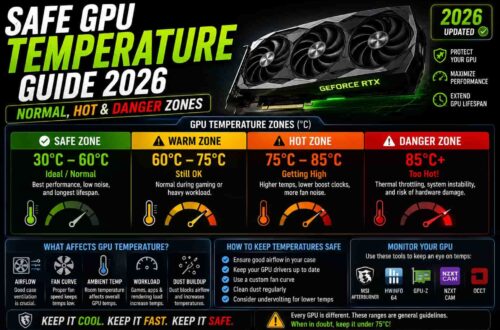
GPU Temperature Reference Table (Celsius & Fahrenheit)
| Usage State | Celsius (°C) | Fahrenheit (°F) | Status |
|---|---|---|---|
| Idle | 30–50°C | 86–122°F | Normal |
| Light load (browsing, video) | 40–55°C | 104–131°F | Normal |
| Gaming / medium load | 60–75°C | 140–167°F | Normal |
| Heavy gaming / rendering | 75–85°C | 167–185°F | Normal, upper safe range |
| Sustained max load | 85–90°C+ | 185–194°F+ | Watch for throttling |
This table applies to desktop GPUs. Laptop GPUs run naturally hotter due to smaller coolers and tighter chassis space — idle temps of 45–55°C and load temps of 75–90°C are common and expected on laptops, so don’t directly compare a laptop GPU reading to a desktop one.
What Counts as Normal GPU Temperature
GPU temperatures aren’t a single number — they change based on workload. To understand whether 50°C is hot, you need to know the typical ranges across different usage scenarios.
Idle Temperature Range (30°C–50°C)
When your GPU isn’t doing much — browsing, watching videos, or sitting at the desktop — it should idle somewhere between 30°C and 50°C, depending on your case airflow and ambient room temperature. A card idling at 50°C is completely normal, especially in a warmer room or a case with limited airflow.
Gaming/Load Temperature Range (60°C–85°C)
Under gaming or heavy workload (like rendering or benchmarking), GPU temperatures naturally climb. A range of 60°C to 85°C is typical and expected. High-end cards with aggressive boost clocks, like Nvidia’s RTX series or AMD’s Radeon RX series, often run in the 70s during intense gaming sessions — and that’s by design.
Max Safe Temperature by GPU Brand
Every GPU has a built-in thermal limit where it starts throttling performance to protect itself:
- Nvidia GPUs (RTX/GTX series): Typically throttle around 83°C–90°C depending on the model.
- AMD GPUs (Radeon RX series): Junction temperature limits often sit between 90°C–110°C, though the “edge” temperature reading is usually lower and more comparable to Nvidia’s reported temp.
Knowing your card’s specific threshold helps you judge whether a reading is fine or worth investigating.
Is 50°C Normal or a Problem?
Let’s directly address the core question with the three most common scenarios.
50°C at Idle = Perfectly Normal
If your GPU shows 50°C while you’re not gaming or running anything demanding, this is completely normal. Some factors — like a slightly warmer room, a case with less airflow, or a blower-style cooler — can push idle temps toward the higher end of the range, and 50°C still falls safely within it.
50°C While Gaming = Excellent, Well-Cooled
If you’re seeing 50°C during gaming, that’s actually impressive. It suggests excellent case airflow, a high-performance cooler, or possibly an aggressive fan curve keeping things cool. Many gamers would consider this an ideal outcome rather than something to worry about.
When 50°C Might Indicate a Sensor or Reading Issue
In rare cases, if a GPU that normally runs much hotter suddenly reports a flat 50°C regardless of load, it could point to a monitoring software glitch or a sensor reporting issue rather than an actual temperature change. This is uncommon, but worth checking with a second monitoring tool if the reading seems inconsistent with your usual performance.
Factors That Affect GPU Temperature
GPU temperature isn’t determined by the card alone — several environmental and hardware factors play a role.
Case Airflow
Poor airflow (not enough intake/exhaust fans, cramped cases, dust buildup) traps heat inside the case, raising both idle and load temperatures. Good airflow with balanced intake and exhaust fans can lower GPU temps by several degrees.
Ambient Room Temperature
The temperature of the room your PC sits in directly affects your GPU’s baseline temperature. A GPU idling at 50°C in a 30°C room isn’t unusual, whereas the same card might idle closer to 35°C in a cooler, air-conditioned space.
Thermal Paste Condition
Over time (usually 2–4 years), thermal paste between the GPU die and its cooler can dry out, reducing heat transfer efficiency and causing higher temperatures than the card originally had when new.
GPU Model (Reference vs. Custom Cooler)
Reference (founder’s edition or blower-style) coolers tend to run hotter than custom, third-party coolers with larger heatsinks and multiple fans. Two of the exact same GPU chip can report very different temperatures purely based on the cooler design.
How to Check GPU Temperature
If you want to verify your GPU’s temperature yourself, several free tools make this simple:
- MSI Afterburner – Widely used, works with any GPU brand, and includes real-time monitoring overlays.
- HWMonitor – Great for a full system temperature overview, including CPU, GPU, and motherboard sensors.
- GPU-Z – Lightweight tool focused specifically on detailed GPU stats, including hotspot and memory junction temperatures.
- Nvidia App / AMD Software – Built-in monitoring from the manufacturer, useful for a quick, no-install check.
Using one of these tools while gaming or under load gives you a much clearer picture than a single idle reading.
When Should You Actually Worry?
While 50°C is nothing to be concerned about, there are genuine warning signs worth watching for:
Temps Above 80°C–85°C Sustained
If your GPU consistently sits above 85°C under normal gaming loads (not benchmarking or stress testing), it’s worth investigating your cooling setup, case airflow, or checking if dust has built up inside the cooler.
Thermal Throttling Signs
If you notice sudden frame rate drops or stuttering during long gaming sessions, your GPU might be thermal throttling — reducing its clock speed to stay within safe temperature limits. This is a clearer performance-based signal than the temperature number alone.
Coil Whine or Noise Combined with High Temps
Unusual coil whine or fan noise paired with unusually high temperatures can indicate a failing fan, blocked airflow, or degraded thermal paste — and is worth a closer look rather than being dismissed.
How to Keep GPU Temps Low
If you want to maintain low, healthy temperatures like 50°C even under load, here are proven methods:
Optimize Case Fan Setup
Aim for balanced intake and exhaust airflow — generally more intake than exhaust creates slight positive pressure, reducing dust buildup while still cooling effectively.
Undervolting
Reducing your GPU’s voltage slightly (while maintaining clock speeds) can lower temperatures and power draw with minimal to no performance loss. Tools like MSI Afterburner make this straightforward.
Repasting Older Cards
If your GPU is a few years old and temperatures have crept up over time, replacing the thermal paste can restore it closer to its original, cooler performance.
FAQs
Is 60°C hot for a GPU?
No. 60°C is still a normal, safe temperature, typically seen under light-to-moderate load. It’s not a cause for concern.
Is 70°C safe for gaming?
Yes, 70°C is a very common and safe temperature during gaming sessions for most modern GPUs.
What temp is too hot for RTX/RX cards?
Generally, sustained temperatures above 85°C–90°C are worth monitoring closely, though exact throttling points vary by specific model.
Does GPU temperature affect FPS?
Yes — if a GPU gets too hot, it throttles its clock speed to protect itself, which can lower FPS and cause stuttering during gameplay.
Is 40°C hot for a GPU?
No, 40°C is on the cooler end of normal and typically seen at idle or light usage. It’s a great reading, not a concern.
Why is my GPU 50 degrees at idle?
This is standard behavior. Idle temperature depends on ambient room temperature, case airflow, and cooler design — 50°C at idle is well within the expected range.
Is 50°C hot for a laptop GPU?
No. Laptop GPUs typically idle a bit warmer than desktop cards due to compact cooling systems, so 50°C at idle is normal and even on the cooler side for a laptop.
What is a dangerous GPU temperature?
Sustained temperatures above 90°C, paired with visible performance throttling or shutdowns, are the point where you should investigate cooling, dust buildup, or thermal paste condition.
For official thermal specifications, you can also check manufacturer resources directly from Nvidia’s support pages or AMD’s Radeon support pages.